
Transfer Domain Name

- Home
- ~
- Domain Transfer
How to Transfer a Domain Name
There are several reasons why you may want to transfer a domain name to another registrar. You may want to manage all your domains in one place, take advantage of features or services offered by a new registrar, obtain better pricing, or simply move away from your current registrar.
Although the domain transfer process may seem complicated at first, it exists to protect domain name holders and prevent unauthorized transfers. The process verifies that the person requesting the transfer has the necessary authorization and that the domain meets the requirements for an inter-registrar transfer.
For additional information, please refer to the official ICANN Transfer Policy and ICANN domain transfer information.
Important: The exact transfer procedure may vary depending on the domain extension and the registry responsible for it. The steps below generally apply to common generic top-level domains (gTLDs), such as .COM, .NET, and .ORG.

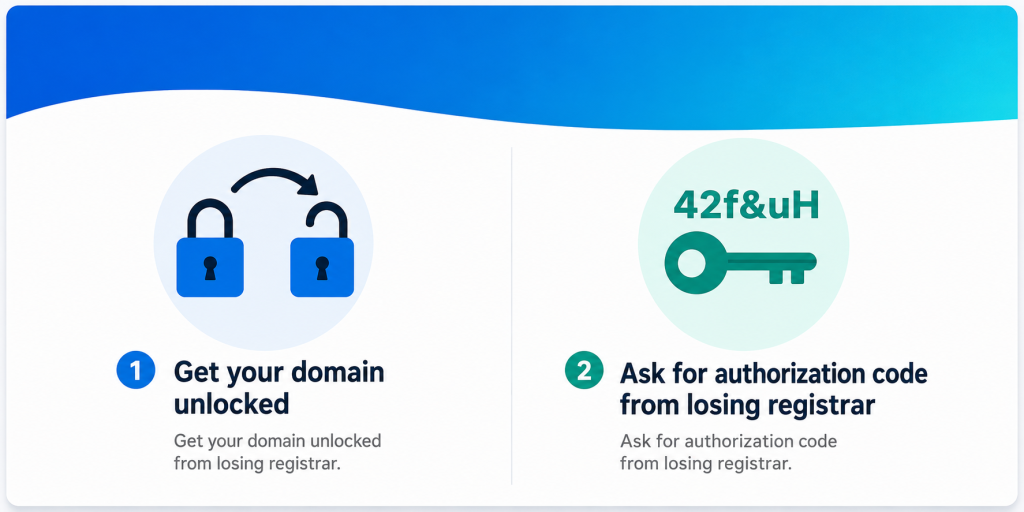
Prepare for the Transfer
Before starting the transfer, you should make sure that your domain is eligible.
First, check that your domain is unlocked and does not have a transfer-prohibited status such as clientTransferProhibited.
Next, obtain the domain’s Authorization Code, also known as an AuthInfo Code, Auth Code, or EPP Code, from your current registrar.
The Authorization Code is a unique code used to help verify that the transfer request is authorized.
You should also make sure that your domain registration information is up to date and that you have access to the contact information associated with the domain.
For more information about Authorization Codes and transfer requirements, see the ICANN Transfer Policy.
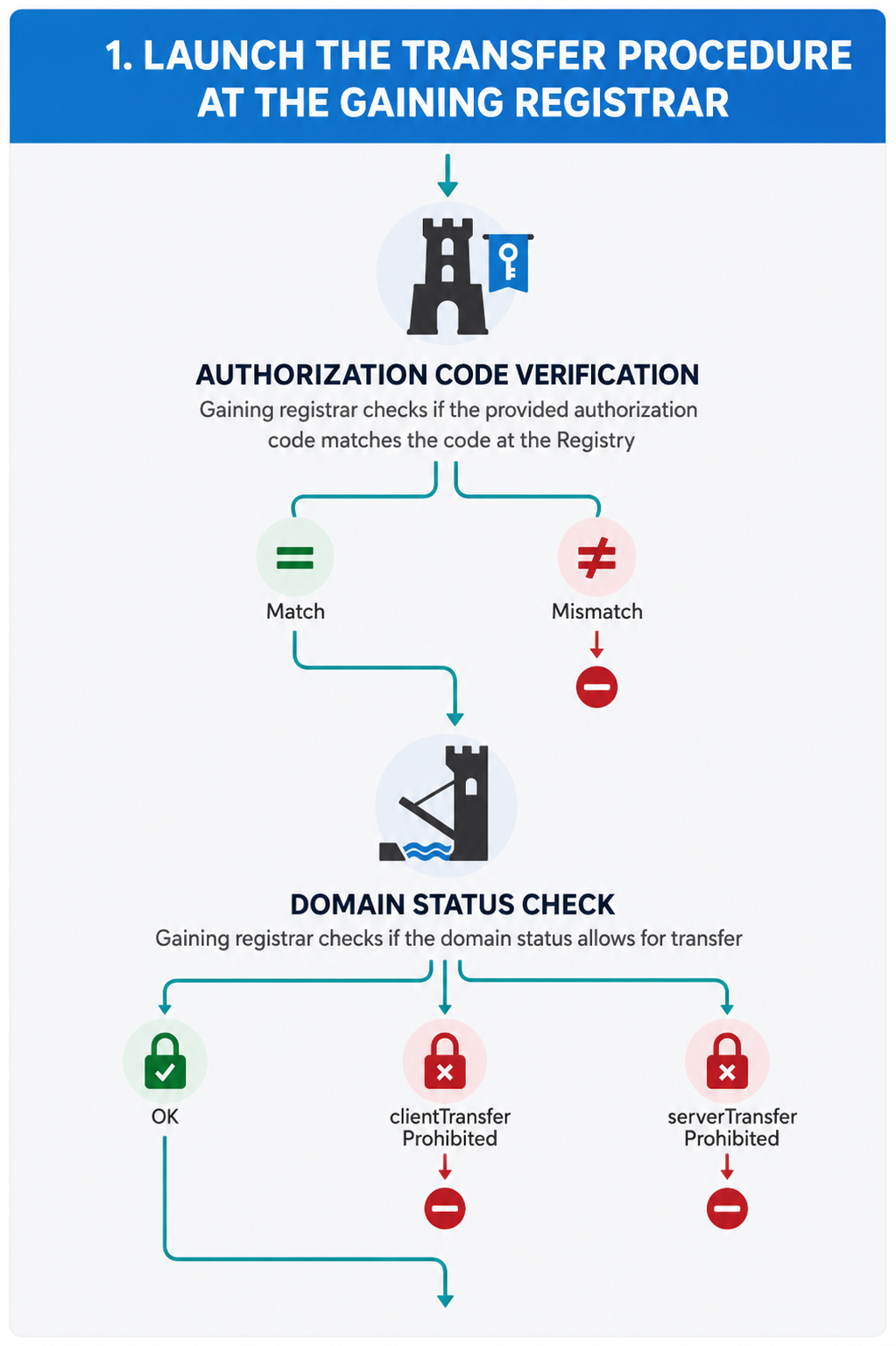
- Launch the Transfer Procedure
Once your domain is prepared, go to the new registrar and place an order to transfer your domain.
During the transfer process, the new registrar will request the Authorization Code provided by your current registrar.
Authorization Code Verification
The gaining registrar submits the transfer request and the registry verifies the Authorization Code.
Match
If the Authorization Code is valid, the transfer can proceed to the next stage.
Mismatch
If the Authorization Code is incorrect or invalid, the transfer request will not proceed. You should verify the code with your current registrar and submit the correct Authorization Code.
- Domain Status Check
The gaining registrar and registry also verify whether the domain is eligible for transfer.
The domain generally must not be subject to a transfer lock.
For example, the following statuses can prevent a transfer:
- clientTransferProhibited
- serverTransferProhibited
If one of these statuses is present, contact your current registrar and request that the applicable transfer lock be removed, if you are eligible to do so.
ICANN requires registrars to provide a reasonable method for eligible domain holders to remove the clientTransferProhibited status.
3. Transfer Authorization and Confirmation
The transfer process may require confirmation from the Registered Name Holder or another authorized transfer contact, depending on the applicable registrar and policy requirements.
The gaining registrar may send an authorization or confirmation request as part of the transfer process.
Make sure you carefully review the email or notification and follow the instructions provided by your registrar.
For the official ICANN standardized transfer authorization process, see the ICANN Standardized Form of Authorization.
- Confirmation from the Losing Registrar
After the transfer request is submitted, the current registrar, also known as the losing registrar, may receive a transfer notification.
Under ICANN’s transfer procedures, the losing registrar has a defined period to object to the transfer when a valid reason exists. If no objection is received within the applicable period, the transfer may proceed according to the policy and registry procedures.
- Finalize the Transfer
Once all required checks and confirmations have been completed, the registry updates the domain’s sponsoring registrar.
The domain is then transferred to the new registrar.
The new registrar will normally notify you when the transfer has been completed.
Important Transfer Restrictions
A domain may not always be eligible for immediate transfer.
For example, ICANN rules generally restrict transfers during certain 60-day periods, including shortly after an initial registration or a previous registrar transfer. Additional restrictions may apply following certain changes to registrant information.
The exact rules can also vary depending on the domain extension and its registry.
Congratulations!
Once the transfer has been successfully completed, your domain is now managed by the new registrar.
Always keep your Authorization Code secure and make sure your domain contact information remains accurate.
For the most current requirements, always consult the official ICANN Transfer Policy and your registrar’s transfer instructions.




Do you want to transfer your domain now?
Start the transfer process now and follow the steps to move your domain to your new registrar.
Choosing the Right Business Hosting Plan?
We’ll help you choose the right business hosting, no pressure, just straightforward support.